Built Shelter’s design system, cutting development time by 50%
Every team was recreating inconsistent components. Designers and developers across Shelter were recreating identical components for every project. No shared standards, no reusable code, just wasted time and inconsistent interfaces.
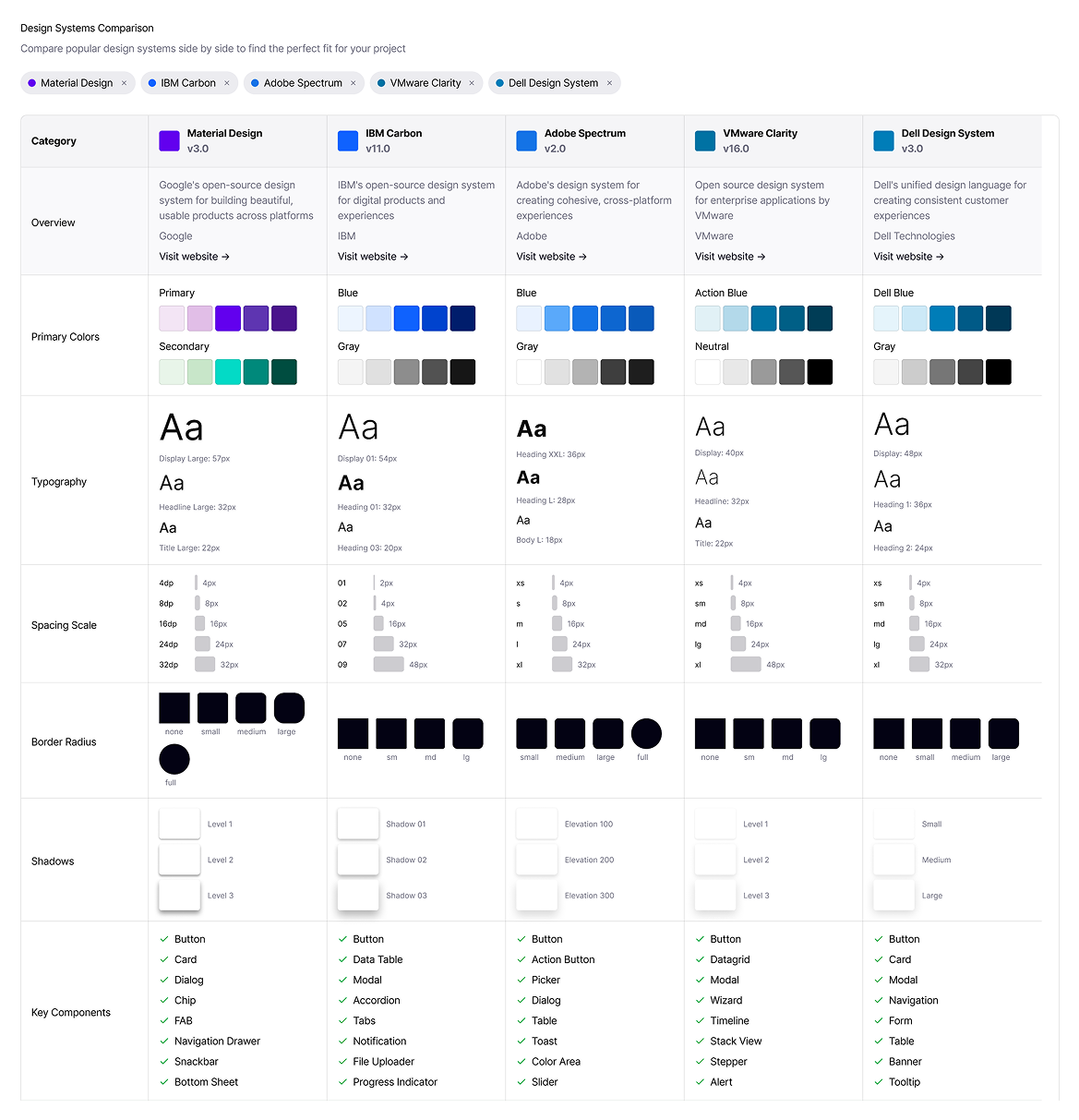
I researched the best systems and adapted them for Shelter. Studied IBM, Material, Clarity, and Adobe's design systems to find patterns that fit our needs. I partnered with engineering to design and build reusable components across React, Angular, and vanilla web.
Impact:
50% reduction in dev task time
First unified design system at Shelter
Now used across all internal and customer-facing products
Shelter Insurance didn't have a design system
Designers recreated the same components for every project, engineers built duplicate code, and insurance customers navigated inconsistent interfaces.
Visual inconsistencies across Shelter's digital products:
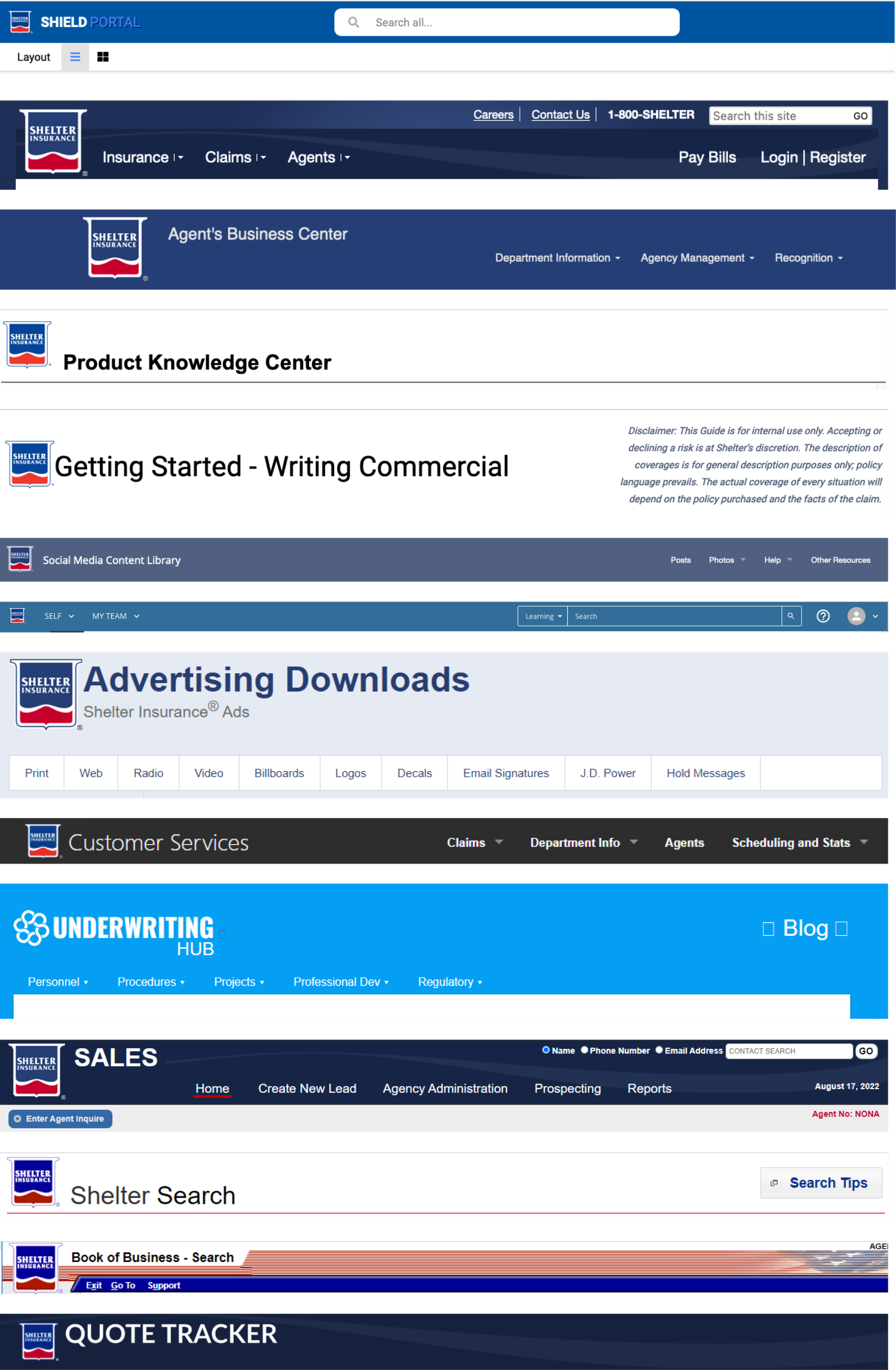
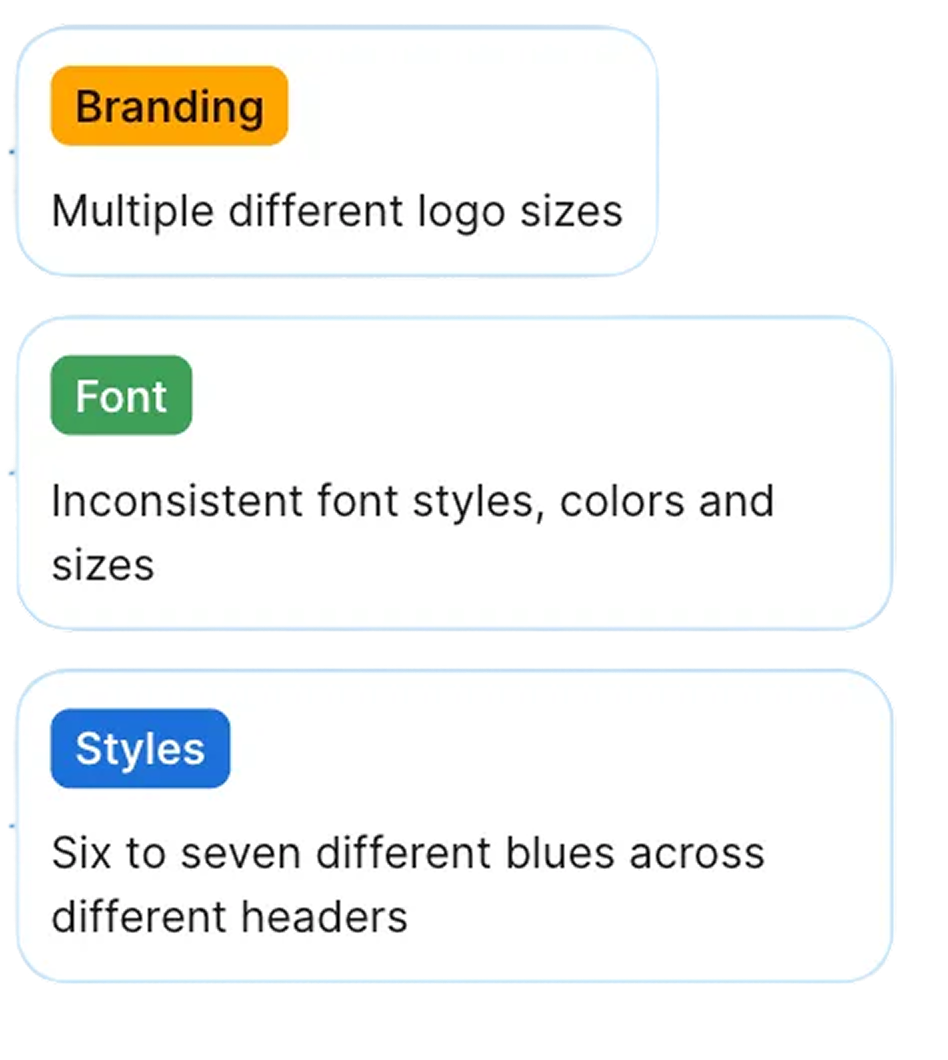
Brand inconsistency across channels: Shelter Insurance's print materials and digital assets followed different styles, varying in color palette, typography, and logo treatments, resulting in inconsistencies in the overall brand experience.
Development inefficiency: Each team spent 9-10 hours per week recreating buttons, forms, and navigation components that already existed elsewhere. This was time that could have been invested in building new customer-facing features.
Fragmented customer experience: Varying button styles, typography, and layouts across pages created a disjointed digital ecosystem that didn't reflect Shelter's strong brand standards.
These inconsistencies slowed product development, fragmented Shelter's brand identity, and created a digital experience that didn't match the quality of Shelter's insurance products.
Design system foundations for Shelter
Before building Shelter’s design system, I audited mature enterprise systems to identify proven patterns for scale, governance, and accessibility.
IBM Carbon: Enterprise governance and documentation; proven in finance and insurance.
Material Design (Google): Comprehensive, multi‑platform component ecosystem.
Clarity (VMware): Data‑dense enterprise application patterns.
Dell Design System: Multi‑brand consistency across diverse product lines.
Adobe Spectrum: Accessibility‑first approach with robust token architecture.
Why these five systems:
Design system foundation: Material Design
Multi‑framework support across React, Angular, and vanilla web, reducing long‑term engineering risk
Familiarity with Google’s component patterns reduces cognitive load and accelerates onboarding
Extensive documentation and examples, enabling faster adoption and consistent implementation
Broad base component coverage (50+ components), allowing teams to build without reinventing core patterns
Material Design served as a foundation, not a final solution. Defaults were adapted to Shelter’s brand through custom color, typography, and component styling, with accessibility built into each component from the start. The system now scales across multiple product areas and serves as the default foundation for new Shelter features, reducing risk while accelerating delivery.
Component architecture and accessibility
With Material Design as our foundation, I partnered with developers to design and build a comprehensive component library that would work across React, Angular, and vanilla web.
From wireframes to production-ready components
I began with low-fidelity wireframes to establish component hierarchy and patterns, working closely with developers to validate technical feasibility and identify which components would deliver the most value.

Hand-drawn sketches

Low-fidelity component library
High-fidelity style guide
I worked closely with engineering to translate hand-drawn sketches into a low-fidelity component library. We built menus, forms, buttons, navigation, and layout grids, establishing clear hierarchies and patterns across each.
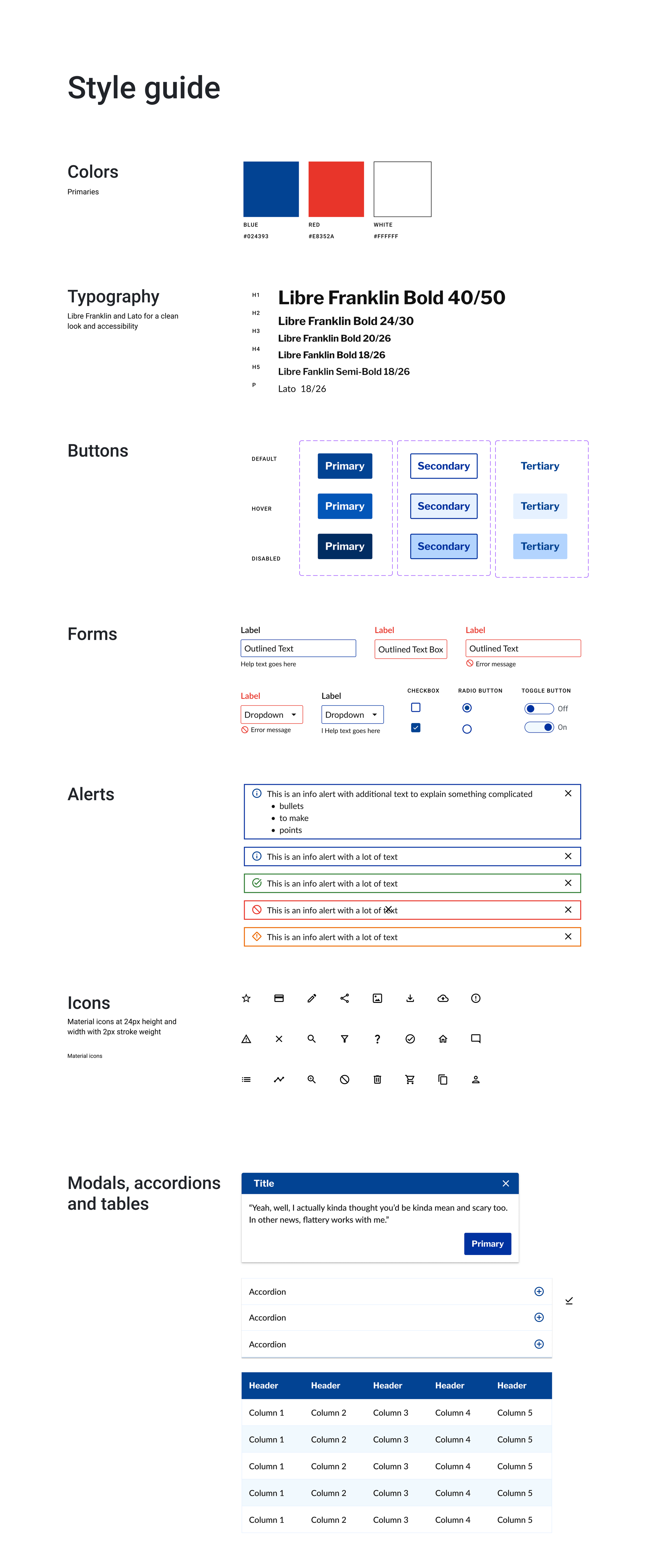
The final style guide established Shelter's brand palette, typography, and standardized form patterns, refined through developer and stakeholder feedback, accessibility testing, and brand alignment.
Before:
Key improvements included:
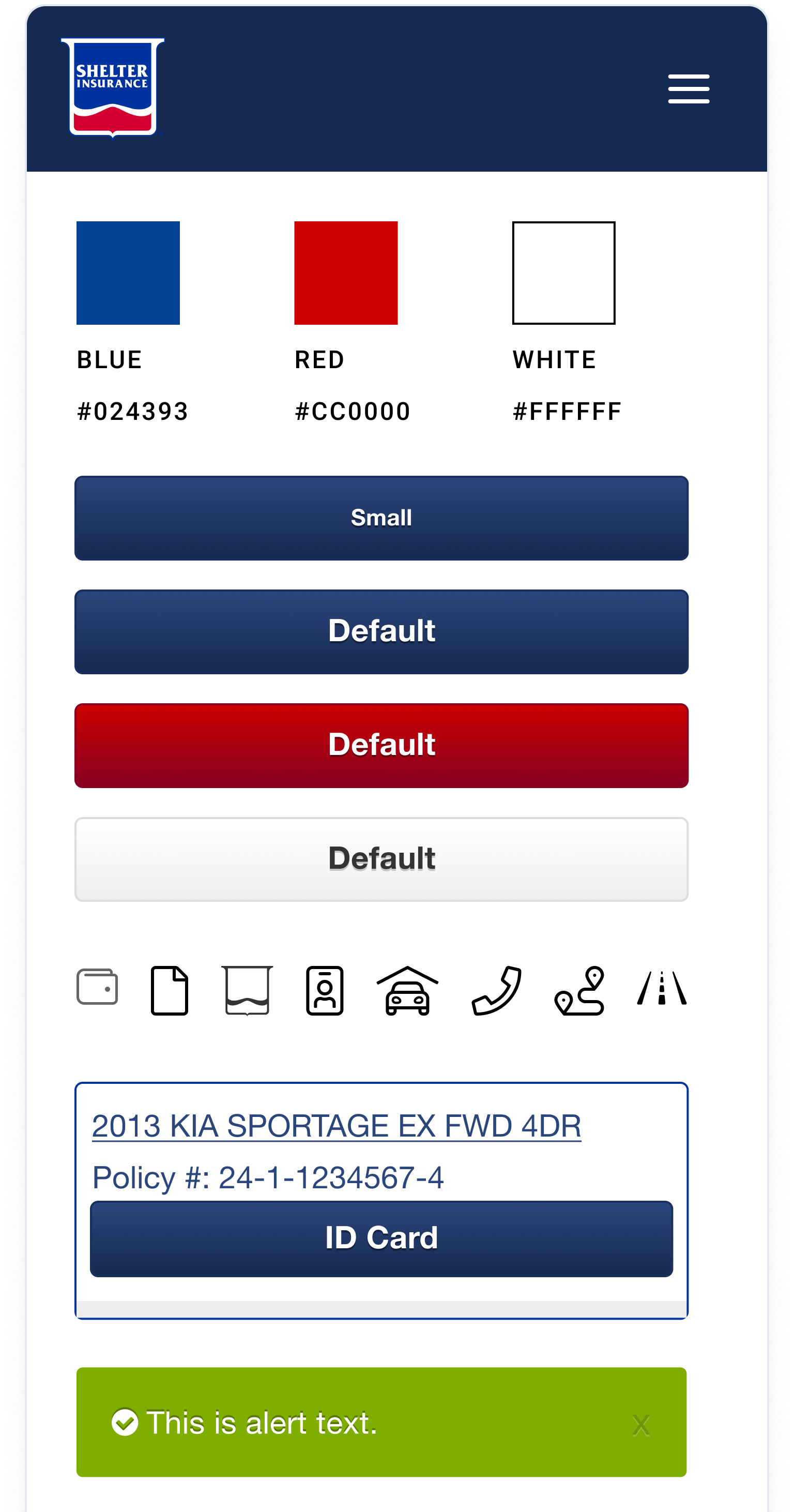
System consolidation and pattern standardization
The design system transformed Shelter's fragmented digital experience into a cohesive, accessible system.
After:
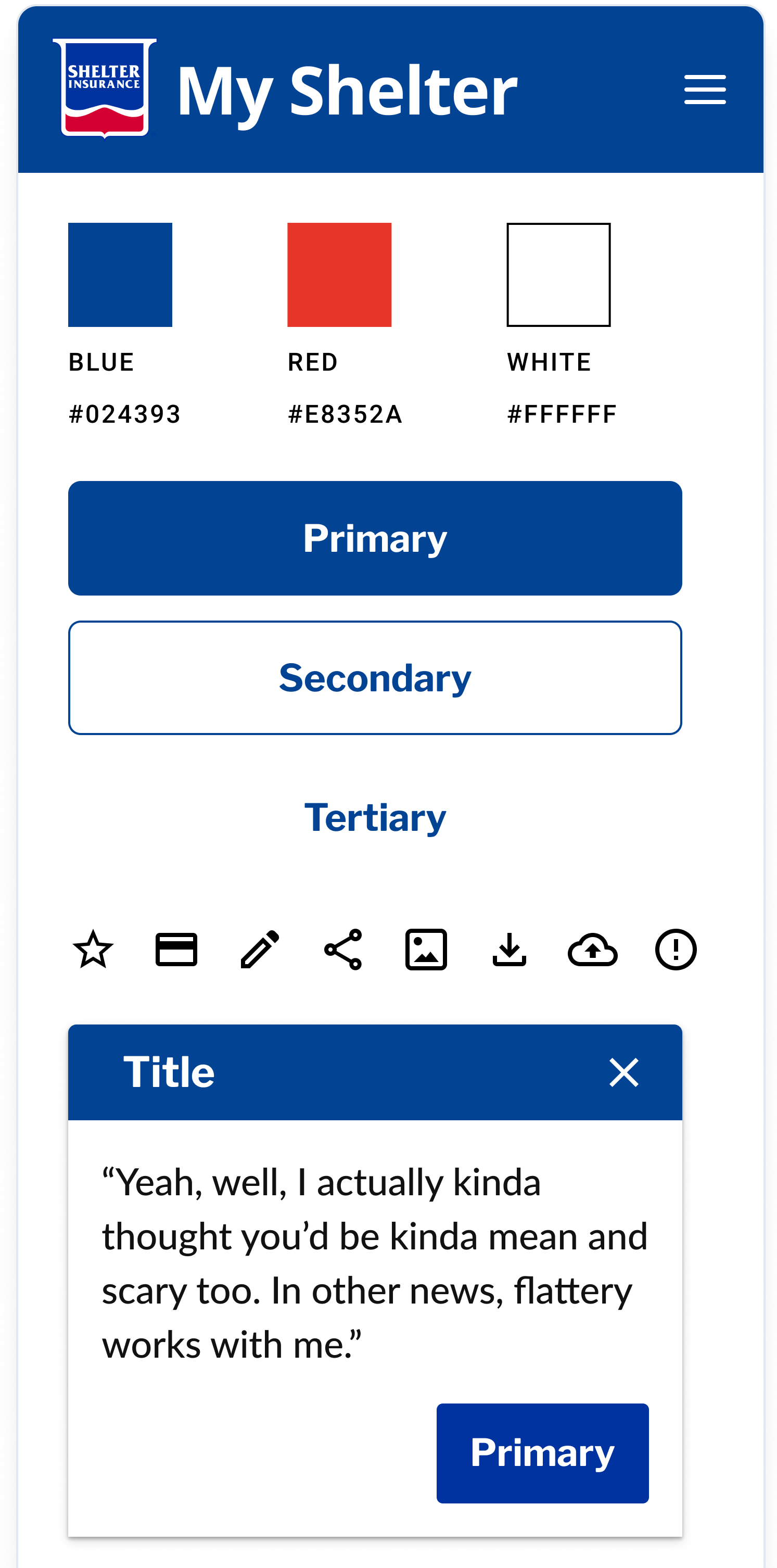
Clear branding:
Added "My Shelter" text to the header for immediate brand recognition and customer orientation
Refined color palette:
Updated red from #CC0000 to #E8352A for better accessibility and brand consistency
Maintained Shelter Blue (#024393) and white as the core palette
Semantic button hierarchy:
Replaced vague labels (Small, Default) with clear semantic naming (Primary, Secondary, Tertiary)
Established visual hierarchy through filled buttons for primary actions, outlined for secondary, text-only for tertiary
Standardized components:
Created a reusable modal pattern with a consistent header, close button, and action placement
Unified icon system with consistent sizing and visual weight
Established component naming conventions for easier implementation
Design system in action
The design system was applied across Shelter's digital products, transforming fragmented experiences into cohesive, accessible tools for insurance customers. Here's how it improved critical customer touchpoints.
From prototype to production: validating the system
Real-life application
DS components prototype
Interactive prototypes built with design system components allowed us to validate patterns with stakeholders and policyholders before development began. This prototype-to-production approach ensured the system worked in real-world scenarios while accelerating development.
Customer dashboard: improving navigation and clarity
The dashboard redesign demonstrates how the design system's standardized components created a more intuitive customer experience.
Before:

After:
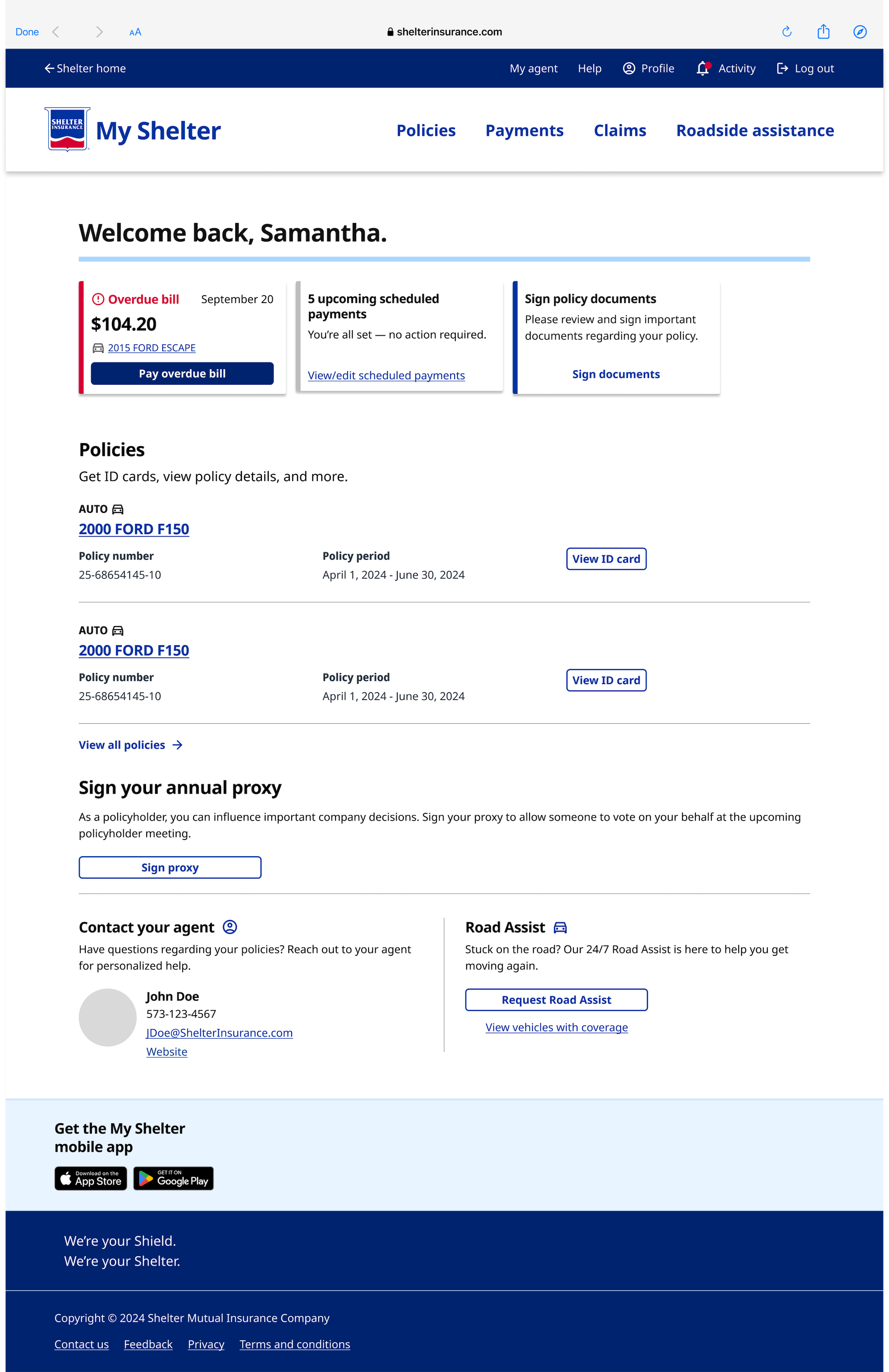
Previous features:
Relied on page-level alerts
Red buttons created friction
Poor hierarchy
New features:
Card-based messaging
Improved top navigation
Clear call-to-action
Strong content hierarchy that enhances usability and clarity
Impact
50% reduction in development time
5 products launched using the design system
Streamlined design-to-development handoff through standardized documentation and reusable components
Established a consistent brand experience across customer-facing products and internal tools